An RCS message stands for Rich Communication Services message. It is a modern type of text message that upgrades traditional SMS with internet-powered features like:
- Read receipts
- Typing indicators
- High-quality images and videos
- Group chats that behave like modern apps
In simple terms, an RCS message is what SMS would look like if it grew up in the smartphone era.
Instead of sending a basic, plain text over a cellular network, RCS uses internet data to create a much richer conversation experience.
Think of it like this:
SMS is a handwritten note. RCS is a live chat conversation with photos, receipts, and real-time updates.
RCS Messaging Meaning
What RCS Actually Stands For
RCS means Rich Communication Services. The name is not just technical jargon. It describes exactly what it does it adds “rich” features to communication.
Where SMS only allows short text, RCS allows:
- Media sharing
- Interactive messaging
- Chat-style features
It turns basic texting into something much closer to apps like WhatsApp or Messenger.
RCS Message Meaning in Plain English
Let’s strip away the complexity.
An RCS message is:
- A text message sent through the internet instead of old SMS networks
- A message that supports images, videos, and reactions
- A conversation that feels real-time and interactive
Here’s a simple analogy:
Imagine SMS is a paper postcard.
Now imagine RCS is a FaceTime chat minus the video call.
Same purpose communication, but completely different experience.
How RCS Messaging Works Behind the Scenes
RCS doesn’t just “replace SMS” overnight. It works through a combination of internet infrastructure and mobile carrier systems.
Internet-Based Messaging vs Traditional SMS
Traditional SMS works like this:
- Your phone sends a message → carrier tower → recipient carrier → phone
- No internet required
- Limited to text only
RCS works differently:
- Your phone connects to the internet
- Message goes through RCS servers
- Delivered instantly to the receiver
So instead of relying only on cellular towers, RCS uses data networks like Wi-Fi or mobile data.
This makes communication:
- Faster
- More stable
- More feature-rich
Role of Mobile Carriers
Unlike apps such as WhatsApp, RCS is not a single company product. It is a carrier-supported messaging standard.
That means:
- Mobile networks must support it
- Android devices must enable it
- Messaging apps must integrate it
This is why RCS rollout has been gradual worldwide.
Google Messages and RCS Integration
On Android, most RCS functionality runs through Google Messages.
This app acts as the bridge between:
- Traditional SMS
- Modern RCS chat features
If your carrier supports it, Google Messages automatically upgrades your chat to RCS.
You’ll usually see a label like:
“Chat features enabled”
That means you’re no longer using basic SMS you’re using RCS.
RCS vs SMS vs MMS: Key Differences You Should Know
Understanding RCS becomes much easier when you compare it to SMS and MMS.
SMS (Short Message Service)
SMS is the original texting system.
Key traits:
- Limited to 160 characters per message
- Works without internet
- No media support
- No delivery confirmation in most cases
It is reliable, but outdated.
MMS (Multimedia Messaging Service)
MMS came next.
It allowed:
- Images
- Audio
- Short videos
But it has problems:
- Poor media compression
- Slow delivery
- High carrier costs in some regions
RCS (Rich Communication Services)
RCS improves everything:
- High-resolution media sharing
- Real-time chat features
- Internet-based delivery
- Modern messaging experience
Comparison Table
| Feature | SMS | MMS | RCS |
|---|---|---|---|
| Internet Required | No | No | Yes |
| Text Limit | 160 chars | Medium | Unlimited practical |
| Media Support | No | Yes (compressed) | Yes (high quality) |
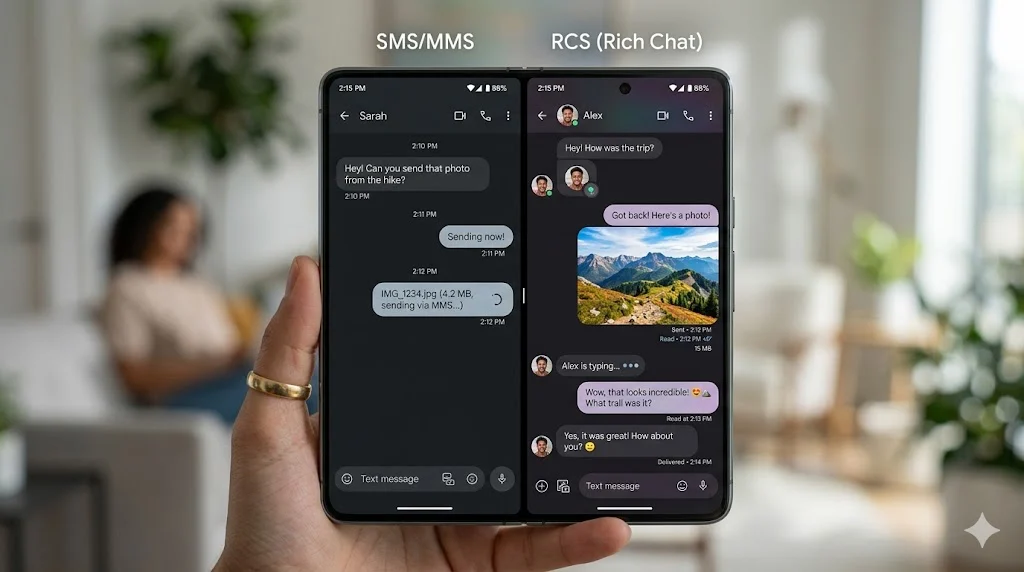
| Read Receipts | No | No | Yes |
| Typing Indicator | No | No | Yes |
| Group Chat | Basic | Limited | Advanced |
Key RCS Messaging Features Explained
RCS isn’t just a “better SMS.” It changes how messaging feels.
Read Receipts
With RCS, you can see when someone reads your message.
Instead of guessing, you get:
- Delivered
- Read
This adds clarity to conversations but can also change communication expectations.
Typing Indicators
When someone replies, you see:
“Typing…”
This makes conversations feel live and interactive.
It reduces awkward waiting and improves flow.
High-Quality Media Sharing
Unlike MMS, RCS doesn’t destroy image quality.
You can send:
- Full-resolution photos
- Clear videos
- Audio files
No heavy compression. No blurry images.
Wi-Fi and Data Messaging
RCS works over:
- Wi-Fi
- Mobile data
That means messages still go through even in places with weak cellular signal.
Group Chat Improvements
RCS group chats behave more like modern apps:
- Better sync
- Clear member lists
- Improved media sharing
- Real-time updates
What Is RCS Chat on Android?
If you’ve ever seen “Chat message” instead of “SMS,” you’ve already used RCS.
On Android, “chat features” mean:
- Your messages use RCS
- Not traditional SMS
- Internet connection is active
This system replaces basic texting inside default messaging apps.
You don’t need to install anything extra.
RCS Messaging Explained in Real Life Use Cases
RCS becomes clearer when you see how it works in daily life.
Sending High-Quality Photos
Instead of sending a blurry MMS image, RCS keeps quality intact.
Perfect for:
- Travel photos
- Documents
- Event pictures
Business Messaging
Companies use RCS for:
- Delivery updates
- Boarding passes
- Appointment confirmations
Messages become interactive instead of static.
Group Conversations
Family and friends can:
- Share media instantly
- See who is typing
- React in real time
It feels more like social media chat than old texting.
Is RCS Messaging Safe?
Security is one of the most discussed parts of RCS.
Encryption Overview
RCS security depends on implementation.
- Some RCS messages use encryption
- Others may rely on carrier-level security
Unlike fully encrypted apps, RCS is not always end-to-end encrypted.
Privacy Considerations
You should know:
- Messages may pass through carrier servers
- Security levels vary by region and app
So while RCS is modern, it is not automatically the most private option.
Why RCS Is Called the “Next Generation SMS”
RCS is often called the replacement for SMS.
Here’s why:
- It solves SMS limitations
- It adds modern features
- It works inside default apps
- It doesn’t require third-party installation
It turns basic texting into a full communication platform.
Mobile Carrier Support for RCS
RCS depends heavily on mobile carriers.
That creates challenges:
- Some carriers fully support it
- Others only partially support it
- Some regions still lack rollout
This uneven adoption is the biggest reason SMS still exists today.
Common Misunderstandings About RCS Messages
Let’s clear up confusion.
“Is RCS a separate app?”
No. It works inside your existing messaging app.
“Is it like WhatsApp?”
Similar features, but:
- WhatsApp is app-based
- RCS is carrier-based
“Does it replace SMS completely?”
Not yet. SMS still exists for fallback and compatibility.
Future of RCS Messaging
RCS is still evolving.
Here’s where it’s heading:
- Wider global carrier adoption
- Better encryption standards
- More business integrations
- Possible universal messaging standard
The long-term goal is simple:
Replace SMS with a unified, modern messaging system.
FAQs
What does RCS message mean in simple words?
An RCS message means a modern text message that uses the internet instead of traditional SMS. It lets you send photos, videos, read receipts, and typing indicators, making texting feel more like a chat app.
Is RCS messaging the same as SMS?
No, it is not the same. SMS only sends basic text through mobile networks. RCS works through the internet and supports richer features like media sharing and real-time chat indicators.
Do I need an app to use RCS messaging?
You usually don’t need a separate app. On most Android phones, RCS works through default messaging apps like Google Messages if your carrier supports it.
Is RCS messaging free to use?
Yes, RCS messages are typically free because they use internet data or Wi-Fi instead of SMS charges. However, your mobile data usage may apply if you’re not on Wi-Fi.
Can iPhone users use RCS messaging?
RCS support on iPhones is limited. Apple mainly uses iMessage, so full RCS features are not widely available across iOS devices yet.
Is RCS messaging safe and private?
RCS is generally safe, but not all messages are fully end-to-end encrypted. Security depends on your carrier and messaging app, so it is not as private as some dedicated chat apps.
Conclusion
An RCS message is not just an upgraded text. It’s a shift in how mobile communication works.
It combines:
- Internet messaging
- Rich media features
- Real-time chat behavior
Instead of plain text, you get a full conversation experience built into your phone’s default messaging system.
It may not be perfect yet, but it clearly points toward the future of texting.
Read More Related Articles:
- What Does a Hemorrhoid Look Like | Real Symptoms You Shouldn’t Ignore In 2026
- What Does Strep Throat Look Like: Symptoms & Appearance In 2026
- What Does Skin Cancer Look Like: Signs and Early Warning Guide In 2026

Ivy Madison is a content creator at TextSprout.com, specializing in word definitions, internet slang, acronyms, and text abbreviations. She delivers clear and engaging explanations, helping readers quickly understand modern digital language and trending terms.