You just sent a video of your dog doing a backflip. Your friend replies, “Why does it look like a potato filmed this?”
That’s SMS. Old. Slow. Embarrassing.
But there’s a fix. It’s called RCS. And it’s quietly turning boring text messages into something that actually feels like 2026.
So what does RCS mean in texting?
Rich Communication Services.
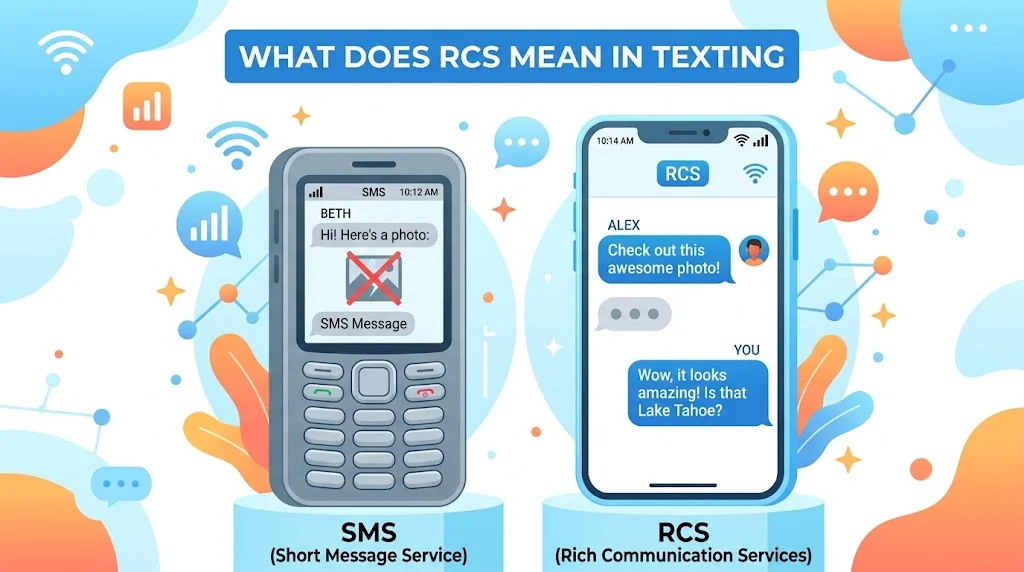
Think of it as SMS after a total makeover. You get read receipts, typing bubbles, high-res photos, and Wi-Fi messaging. No extra apps. Just your regular texting app working way better.
This guide walks you through everything. No fluff. Just real answers.
What Does RCS Stand For? Let’s Kill the Confusion
RCS stands for Rich Communication Services.
Not “real chat system.” Not “read confirmation service.” People guess those all the time. But the actual name tells you exactly what it does: rich communication.
“Rich” here means more than plain text.
- Send full-resolution images
- Share videos without compression
- See when someone reads your message
- Watch them type in real time
All inside your default texting app.
Here’s a quick breakdown of the abbreviation:
| Letter | Stands For | Meaning |
|---|---|---|
| R | Rich | Beyond plain text. Includes media, receipts, reactions |
| C | Communication | Two-way conversation. Not just broadcasting |
| S | Services | A protocol. A set of rules phones follow |
SMS (Short Message Service) came out in 1992. It worked great for Nokia phones with green screens.
RCS launched around 2008 but only got real traction after 2019. That’s when Google pushed hard.
So when someone asks “what does RCS mean in texting,” you can say it’s the replacement for SMS. The one we should have had fifteen years ago.
RCS vs SMS: A Side-by-Side Reality Check
Let’s get honest. SMS still works. You can send “I’m here” to anyone with any phone. That’s its superpower: universal reach.
But universal doesn’t mean good.
Here’s a table showing the real differences. No marketing spin.
| Feature | SMS | RCS |
|---|---|---|
| Message length | 160 characters max | Unlimited |
| Photo quality | Compressed to under 1MB | Up to 100MB (original quality) |
| Video sharing | Blurry, choppy, useless | HD or 4K (carrier dependent) |
| Read receipts | No | Yes (double checkmarks) |
| Typing indicators | No | Yes (the “…” bubble) |
| Wi-Fi sending | No (requires cellular) | Yes |
| Group chat naming | No | Yes |
| Leave group chats | No | Yes |
| Message reactions | No | Yes (thumbs up, heart, etc.) |
| End-to-end encryption | No | Partial (Google Messages one-to-one) |
| File sharing | No | Yes (PDFs, contacts, locations) |
Example: You try to send a 30-second 4K clip of a concert.
- SMS/MMS says no. Or it crushes it down to a pixelated mess.
- RCS sends it directly. Your friend sees the bass drop in crisp detail.
That’s the difference between frustrating and functional.
But here’s the catch. Both people need RCS enabled. If your friend uses an old flip phone or an iPhone without RCS support, your message falls back to SMS/MMS automatically. You won’t even notice. Except your media will look terrible again.
How RCS Messaging Actually Works
You don’t need to understand the technical guts. But a simple analogy helps.
SMS works like walkie-talkies.
You push a button. The message travels through cellular control channels. Very reliable. Very basic. No frills.
RCS works like WhatsApp or iMessage.
It uses internet data. Wi-Fi or cellular. Your phone talks to a server. That server routes your message to your friend’s phone. The server also tracks read status and typing activity.
Here’s the real flow:
- You type a message in Google Messages or Samsung Messages.
- Your phone checks: does the recipient support RCS?
- If yes → sends over data/Wi-Fi. Rich features work.
- If no → falls back to SMS. No read receipts. No high-res media.
Carriers like T-Mobile, AT&T, and Verizon host their own RCS servers. But many phones use Google’s Jibe platform instead. That’s why most modern Androids have RCS working out of the box.
Fact: As of early 2026, over 1.2 billion devices support RCS globally. That’s not a niche feature anymore.
RCS Messaging Features You Can Actually Use Today
Let’s stop talking about theory. Here’s what RCS does on your phone right now.
List of real, working RCS features:
- High-resolution photo sharing – No more “sent as a slideshow” nonsense.
- HD video transfer – Short clips look normal.
- Read receipts – Two checkmarks. One for sent. One for read.
- Typing indicators – You see the three dots. They see yours.
- Wi-Fi messaging – Works in airplane mode with Wi-Fi on.
- Group chat names – Name your family thread “Chaos Coordinator.”
- Add or remove people – Yes, you can kick someone from a group.
- Message reactions – Heart a text instead of replying “nice.”
- Reply to specific messages – Threaded replies inside texts.
- Send files up to 100MB – PDFs, MP3s, short videos.
- Location sharing – Pin drops without Google Maps links.
- Voice messages – Built-in. Like walkie-talkie but cleaner.
- Better spam protection – Carrier-grade filtering.
Short sentence for impact: SMS gives you words. RCS gives you a conversation.
Example scenario:
You’re planning a surprise party. Group chat of eight people.
- SMS: Messages arrive out of order. Can’t leave the chat. No way to know who saw “bring ice cream.”
- RCS: Name the chat “Surprise Squad.” See exactly who read the plan. React with a confetti emoji. Leave when the party’s over.
That’s not futuristic. That’s how texting should have always worked.
RCS vs iMessage vs WhatsApp: Where Does It Fit?
People always ask: “Why not just use WhatsApp or iMessage?”
Fair question. Here’s the honest answer.
iMessage – Only works iPhone to iPhone. If you text an Android, it falls back to SMS. Green bubbles. Low quality. No read receipts.
WhatsApp – Works everywhere. Encrypted. Feature-rich. But everyone must download the same app. That’s a barrier.
RCS – Lives inside your default texting app. No download required. Works across most Android phones automatically. And soon, iPhones too.
Comparison table:
| Feature | SMS | RCS | iMessage (iPhone to iPhone) | |
|---|---|---|---|---|
| Needs app download | No | No | No | Yes |
| Works across Android/iOS | Yes (but poorly) | Partial (iOS support coming) | No | Yes |
| Read receipts | No | Yes | Yes | Yes |
| Typing indicators | No | Yes | Yes | Yes |
| High-res media | No | Yes | Yes | Yes |
| Encryption | No | Partial | Yes (iMessage) | Yes |
| Group chat features | No | Yes | Yes | Yes |
The real win for RCS: It’s the only system that doesn’t ask you to change your behavior. You just keep using the same texting app. It quietly works better.
Quote someone might actually say:
“I don’t want another app. I just want my regular texts not to suck.”
That’s RCS.
RCS Chat in Google Messages: The Default Experience
If you own an Android phone from Samsung, Google Pixel, OnePlus, or Motorola, you already have Google Messages or Samsung Messages. Both support RCS.
Google calls it Chat features.
Here’s how to check if it’s on:
- Open Google Messages.
- Tap your profile picture (top right).
- Select “Messages settings.”
- Tap “RCS chats” (or “Chat features”).
- Look for status: “Connected”
If it says “Connected,” you’re using RCS right now. Congratulations.
Facts about Google Messages RCS:
- Over 1 billion monthly active users
- Supports end-to-end encryption for one-to-one chats (not groups yet)
- Works over Wi-Fi and cellular data
- Allows file transfers up to 100MB
- Includes reactions, replies, and read receipts
What happens if the other person doesn’t have RCS?
Google Messages automatically switches to SMS/MMS. You’ll see the text box say “Text message” instead of “RCS message.” No extra steps.
Short warning: If you disable RCS before switching phones, you might lose messages. Always turn off RCS on your old phone first. Google has a deactivation page for this. Use it.
What Does RCS Mean for iPhone Users? (Yes, It’s Changing)
Apple resisted RCS for years. iMessage was their lock-in. Blue bubbles vs green bubbles. You know the drama.
But in late 2024, Apple caved. Regulatory pressure. Carrier pressure. User complaints.
Here’s what’s coming:
- iOS 18 will add RCS support (expected full rollout by early 2025)
- iPhone-to-Android texts will finally have read receipts and typing indicators
- High-res photos and videos will work cross-platform
- Group chats will stop breaking
But there’s fine print:
- Apple will use their own RCS implementation (not Google’s)
- Encryption may not be compatible at first
- Some advanced features may lag behind Android
What RCS means for an iPhone user texting an Android user after iOS 18:
No more blurry media. No more guessing if they saw your message. No more group chat chaos.
What it still won’t do:
Give you blue bubbles. Those stay inside iMessage.
So when someone asks “what does RCS mean in texting” for an iPhone, the answer is: finally, a bridge.
The Downsides of RCS: Let’s Be Honest
No tech is perfect. RCS has real problems. Pretending otherwise hurts everyone.
List of current RCS limitations:
- No universal encryption – Only Google Messages one-to-one chats are encrypted. Samsung Messages? Not yet. Carriers? Not yet. Groups? No.
- Carrier fragmentation – T-Mobile, AT&T, and Verizon all run different RCS servers. Sometimes they don’t talk well.
- No default on all phones – Some budget Androids still ship without RCS enabled.
- Apple adoption is slow – Even after iOS 18, full feature parity will take time.
- Fallback to SMS is clunky – You might not notice when media fails. You just get angry at your friend instead.
- No read receipt control – On some carriers, you can’t turn off read receipts for specific people.
- Spam isn’t fully solved – RCS doesn’t magically block all robotexts. Carriers still handle that.
Example of a real RCS failure:
You’re on AT&T. Your friend is on Verizon. Both have RCS. But Verizon uses Google Jibe. AT&T uses their own server. Sometimes read receipts break. Sometimes messages send as SMS without warning.
Short punchy truth: RCS is better than SMS. It is not better than WhatsApp for security. Know the trade-off.
RCS Messaging Security and Encryption: What’s Actually Protected
People hear “new texting protocol” and assume it’s secure. Not always true.
Here’s the encryption breakdown by platform:
| Platform | One-to-One Encryption | Group Encryption | Encryption Type |
|---|---|---|---|
| Google Messages (RCS) | Yes | No | Signal Protocol |
| Samsung Messages (RCS) | No | No | None (carrier dependent) |
| Carrier RCS apps | No | No | None |
| Apple RCS (future) | Unknown | Unknown | Likely not cross-platform |
What does that mean for you?
If you use Google Messages and text another Google Messages user, your chat is encrypted end-to-end. No one else reads it.
Not Google, not your carrier and not hackers.
If you use Samsung Messages, your RCS texts are not encrypted. Your carrier can technically read them.
Quote from a security engineer (paraphrased):
“RCS without encryption is just SMS with nicer stickers.”
Practical advice:
- For sensitive conversations, use Signal or WhatsApp.
- For everyday texting, Google Messages RCS is fine.
- Avoid carrier RCS apps if you care about privacy.
Fact: Google added E2EE to RCS in 2021. It took three more years to reach most devices. Groups still don’t have it as of 2026.
The Future of RCS Messaging
SMS will die. Not today. But soon.
The GSMA (the mobile industry group that makes the rules) already declared RCS the official successor to SMS/MMS. Carriers are onboard. Apple is joining. Google is pushing hard.
What the next three years will bring:
- Cross-platform encryption – Apple, Google, and carriers will agree on a standard. Eventually.
- RCS business messaging – Brands will send you receipts, boarding passes, and appointment reminders inside RCS. Not SMS. Rich, interactive, secure.
- Payments over RCS – Send money like you send a photo. Already testing in some regions.
- Better group chat features – Polls, events, shared albums.
- No more SMS fallback – Once adoption crosses 95%, carriers will phase out SMS entirely.
Short prediction: By 2028, SMS will feel like a pager. Technically functional. Practically obsolete.
What does RCS mean in texting five years from now?
It means texting won’t be a punchline anymore.
How to Enable RCS on Your Phone
You don’t need a degree. Just follow this.
For Google Messages (most Androids):
- Download Google Messages from Play Store if not preinstalled.
- Open it. Make it your default SMS app.
- Tap your profile picture.
- Go to Messages settings.
- Tap RCS chats (or Chat features).
- Toggle “Enable RCS” on.
- Wait for “Connected” status.
For Samsung Messages:
- Open Samsung Messages.
- Tap three dots (top right).
- Go to Settings.
- Tap Chat settings.
- Toggle on “Rich Communication Services” or “Chat features.”
- Note: Encryption is not available here.
Troubleshooting common RCS issues:
| Problem | Fix |
|---|---|
| RCS says “Setting up” for hours | Turn off RCS. Restart phone. Turn back on. |
| Messages send as SMS automatically | Check recipient’s phone. They may not have RCS. |
| Read receipts not working | Both users must enable them in settings. |
| RCS was working but stopped | Toggle airplane mode on/off. Or clear carrier services app data. |
Warning: If you switch phones, disable RCS on the old device first. Otherwise, your new phone won’t get messages. Google has a web tool to fix this. Search “Google RCS deactivate.”
FAQs
What does RCS mean in texting for Android users?
It means your default texting app gains iMessage-like features. Read receipts. Typing indicators. High-res media. Wi-Fi messaging. All without downloading a new app.
Is RCS the same as SMS?
No. SMS uses cellular voice channels. RCS uses internet data. RCS supports longer messages, better media, and live chat indicators. SMS is ancient. RCS is the upgrade.
Does RCS work on iPhone?
Not yet. Apple announced RCS support for iOS 18. Expected full rollout in late 2025 or early 2026. Once live, iPhone-to-Android texts will finally have read receipts and high-quality media.
Is RCS messaging free?
Yes. It uses your mobile data or Wi-Fi. Carriers do not charge per message. If you have no data plan, RCS won’t work (but SMS fallback will).
Does RCS have read receipts?
Yes. Both people see when a message is sent, delivered, and read. You can turn this off in settings if you want.
Can I use RCS without Google Messages?
Yes. Samsung Messages supports RCS. Some carrier apps like T-Mobile’s default messenger also support it. But features vary. Google Messages offers the most complete experience including encryption.
What does RCS mean in texting for group chats?
It means you can name groups, add or remove people, see who read each message, and reply to specific texts. SMS group chats are chaotic. RCS group chats feel modern.
Is RCS end-to-end encrypted?
Only in Google Messages one-to-one chats. Group chats are not encrypted. Samsung Messages and carrier RCS apps have no encryption at all. Use WhatsApp or Signal for truly private conversations.
Conclusion:
You don’t need another messaging app. You need your current one to stop being terrible.
That’s what RCS does. It takes the thing you already do every day sending texts and makes it work like it’s 2026. Not 1992. High-res photos. Real read receipts. Typing bubbles. Wi-Fi support. Group chats that don’t explode into chaos.
No, it’s not perfect. Encryption is patchy. Carrier support varies. And iPhone users are still waiting. But for most people on most phones, RCS already works. You just have to turn it on. So next time someone asks, “What does RCS mean in texting?” you’ve got the full answer.
It means SMS grew up. Finally.
Read More Related Articles:
- Consecutive Mean in Math: Hidden Pattern Behind Many Word Problems In 2026
- “Eres” Meaning in Spanish: More Than Just “You Are” In 2026
- KK Mean in Texting: Why It Can Sound Passive-Aggressive (2026)

Ivy Madison is a content creator at TextSprout.com, specializing in word definitions, internet slang, acronyms, and text abbreviations. She delivers clear and engaging explanations, helping readers quickly understand modern digital language and trending terms.