
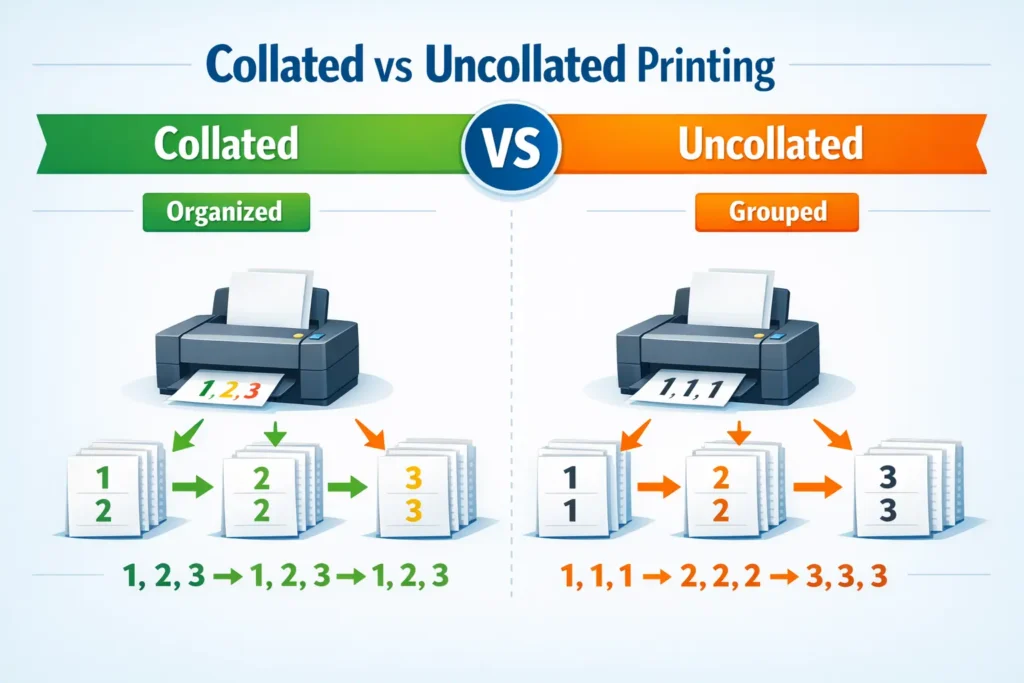
Collate in printing means arranging printed pages in the correct sequential order when printing multiple copies of a document.
For example, if you print three copies of a 5-page document:
- Collated printing will produce: 1,2,3,4,5 → 1,2,3,4,5 → 1,2,3,4,5
- Uncollated printing will produce: 1,1,1 → 2,2,2 → 3,3,3 → 4,4,4 → 5,5,5
In simple words, collate means printing complete sets of a document in order.
If you have ever printed a multi-page document and noticed an option called “collate”, you might have wondered what it actually does. At first glance, it sounds technical or confusing, especially if you are not familiar with printer settings. But in reality, it is a very simple concept that can make your printing experience much easier and more organized.
Whether you are printing school assignments, office reports, booklets, or multiple copies of a document, understanding collate in printing can save you time and prevent confusion. Let’s break it down in a clear and human way so you never get confused by it again.
What Does Collate Actually Mean?
The word collate comes from the idea of collecting and arranging things in a proper sequence. In printing, it refers to how pages are organized when multiple copies of a document are being printed.
Imagine you have a school assignment that is 5 pages long and you need 3 copies. You can print it in two ways:
- Collated printing: Each copy is complete from page 1 to page 5
- Uncollated printing: Pages are grouped by number instead of full sets
Collate simply ensures that every printed copy is already organized and ready to use without you having to sort pages manually afterward.
Simple Real Life Example of Collate
Let’s make it even easier to understand.
Imagine you are printing a small booklet:
Pages are:
Page 1, Page 2, Page 3
You need 2 copies.
If you choose collate:
You get:
Copy 1 → 1, 2, 3
Copy 2 → 1, 2, 3
If you do not choose collate:
You get:
Page 1 → Page 1, Page 1
Page 2 → Page 2, Page 2
Page 3 → Page 3, Page 3
Now you would have to manually arrange them yourself, which can be time consuming.
That is exactly why collate exists.
Why Collate Matters in Printing
Collating might seem like a small option, but it becomes very important when dealing with larger documents.
Here’s why it matters:
1. Saves Time
Without collating, you would have to manually sort pages after printing.
2. Prevents Confusion
Collated printing ensures pages are already in order.
3. Professional Results
Reports, booklets, and assignments look clean and organized.
4. Reduces Errors
Manual sorting increases the chance of mixing pages. Collation removes that risk.
Collated vs Uncollated Printing
Understanding the difference is key.
| Feature | Collated Printing | Uncollated Printing |
|---|---|---|
| Page Order | Full sets in order | Pages grouped by number |
| Example | 1,2,3 → 1,2,3 → 1,2,3 | 1,1,1 → 2,2,2 → 3,3,3 |
| Use Case | Reports, books, assignments | Large bulk printing |
| Convenience | High | Requires manual sorting |
| Time Saving | Yes | No |
This comparison shows that collated printing is usually the better choice for everyday use.
When Should You Use Collate?
Collate is not always necessary, but in most situations it is extremely helpful.
You should use collated printing when:
- Printing school or college assignments
- Printing reports or documents
- Making booklets or handouts
- Printing meeting materials
- Creating multiple copies of organized content
Basically, whenever you need complete sets of a document, collate is the best option.
When Should You NOT Use Collate?
There are some cases where uncollated printing is actually better.
You might skip collate when:
- Printing large batches for manual sorting
- Printing forms or sheets that will be separated later
- Doing industrial or bulk printing tasks
- You need grouped pages for cutting or distribution
For example, if you are printing hundreds of forms and each page will be separated individually, collate is not necessary.
How Collate Works in a Printer
When you select the collate option, the printer automatically adjusts the printing order. Instead of printing all page 1s together, it prints a full document set before starting the next copy.
Here’s what happens behind the scenes:
- The printer reads the full document
- It stores the page order temporarily
- It prints one complete set
- Then repeats for the next copy
Modern printers and software handle this automatically, so you do not need to do anything manually.
Example in Real Life Situations
Example 1: School Assignment
You are printing a 10-page assignment and need 2 copies.
- Collate ON → Two complete sets of 1 to 10
- Collate OFF → All page 1s first, then page 2s, and so on
Clearly, collated printing is easier here.
Example 2: Office Report
A manager needs 5 copies of a 15-page report.
Collated printing ensures each report is ready to distribute without sorting.
Example 3: Bulk Forms
A company prints 1000 forms.
Uncollated printing might be better because pages may be separated and processed individually later.
Common Printer Settings Related to Collate
When you open print settings, you may see:
- Copies
- Pages
- Print range
- Collate checkbox
If “collate” is checked:
Your pages will print in complete sets.
If it is unchecked:
Pages will print grouped by page number.
Simple as that.
Collate in Digital vs Physical Printing
Collate is not just for physical printers. It also appears in digital document tools like PDF viewers and office software.
In digital printing systems:
- The software controls page order
- The printer follows instructions automatically
- Collation ensures proper sequencing before printing begins
This makes modern printing very efficient compared to older manual systems.
Advantages of Using Collate
Here are the biggest benefits:
- Saves manual sorting time
- Ensures accuracy in document order
- Makes documents look professional
- Reduces human error
- Improves workflow efficiency
For most everyday users, collated printing is the default recommended option.
Disadvantages of Collate
Even though it is useful, there are a few minor downsides:
- Slightly slower for large print jobs
- May not be ideal for bulk separated sheets
- Uses more printer memory in some cases
However, for most users, these disadvantages are minimal compared to the benefits.
Tips for Using Collate Properly
- Always check preview before printing
- Use collate for multi-page documents
- Double-check number of copies
- Turn off collate only when needed
- Learn your printer settings for better control
FAQs
What does collate mean in printing?
It means printing pages in correct order for each complete copy of a document.
What happens if I do not select collate?
Pages will print grouped by number instead of full sets, requiring manual sorting.
Is collate on or off better?
For most documents, collate ON is better because it keeps pages organized.
Does collate use more ink?
No, it does not affect ink usage. It only changes page order.
Why is collate important?
It saves time and ensures each printed copy is complete and properly ordered.
Can I collate PDF files?
Yes, most PDF viewers and printers support collated printing.
What is the opposite of collate?
The opposite is uncollated printing, where pages are grouped by number.
Do all printers support collate?
Most modern printers do, especially office and home printers.
Conclusion
The collate option in printing is one of those features that seems small but makes a big difference. It simply means printing pages in proper order for each complete copy of a document.
When collate is turned on, your document comes out neatly organized, ready to use without any extra effort. When it is turned off, pages are grouped together, which may require manual sorting.
For everyday printing like assignments, reports, and documents, collated printing is usually the best choice. It saves time, reduces confusion, and ensures professional results.
Once you understand it, using collate becomes second nature and makes printing much more efficient.
Read More Related Articles:
- MMCHT in Texts: Meaning, Tone, and How to Use It in 2026
- What Does Te Amo Mean in English? Here’s the Truth (2026)
- SG in Text: The Meaning Changes More Than You Think (2026)

Neon Samuel is a digital content creator at TextSprout.com, dedicated to decoding modern words, slang, and expressions. His writing helps readers quickly grasp meanings and understand how terms are used in real conversations across text and social platforms.