
Email looks simple on the surface. You type, you send, and someone receives your message. But once you open that compose window, a few fields appear that confuse many people. One of the most misunderstood is CC.
You’ve probably seen it. Maybe you ignored it. Maybe you used it without fully knowing what it does.
And here’s the truth: CC isn’t just a random option. It plays a key role in communication clarity, workplace transparency, and even email etiquette.
Let’s break it down in a way that actually sticks.
What Does CC Mean in Email?
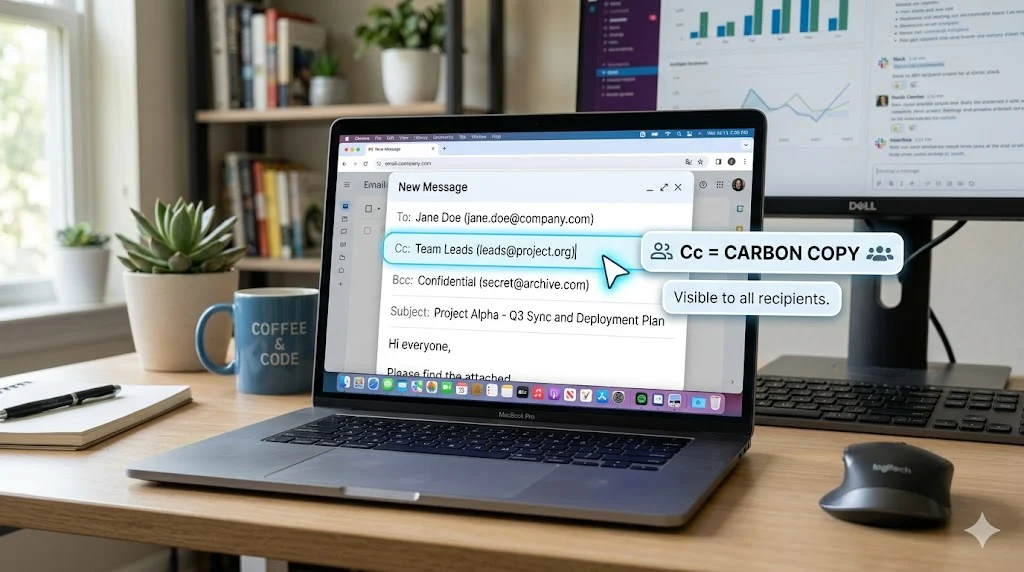
CC stands for Carbon Copy.
In email terms, CC means sending a copy of your email to additional people who are not the main recipient but still need to stay informed.
When you add someone in the CC field:
- They receive the same email
- They see the main recipient
- They see other CC recipients
So CC acts like a “keep in the loop” feature.
Why it’s called Carbon Copy
The term comes from old-school typing methods. Before digital emails existed, people used carbon paper between sheets to duplicate documents.
You typed once, but multiple copies appeared.
Email borrowed that idea. Instead of physical duplication, you now duplicate information digitally.
CC Meaning in Email: What It Really Does Behind the Scenes
Let’s go beyond the definition and look at how CC actually behaves.
When you send an email:
- The To field identifies the primary recipient
- The CC field adds secondary recipients
- The system sends identical copies to everyone listed
But here’s the important part:
CC is not decorative. It actively changes communication flow.
It creates visibility across recipients. That visibility shapes responsibility, awareness, and response behavior.
For example:
- A manager CC’d in an email can silently monitor progress
- A teammate CC’d knows they are included for awareness, not action
- A client CC’d gets transparency into communication history
What Does CC Stand for in Email Communication?
CC doesn’t just stand for Carbon Copy in theory.
In practice, it stands for:
- Awareness
- Transparency
- Documentation
- Inclusion without responsibility
Think of CC like sitting someone in the room during a conversation, even if they’re not speaking.
They listen. They observe. But they don’t drive the conversation.
How CC Works in Email
Understanding CC becomes easier when you see it in action.
Here’s what happens when you send an email with CC:
Step 1: You write the main recipient
This goes in the To field.
Example:
- To: Project Manager
Step 2: You add CC recipients
These are secondary viewers.
Example:
- CC: Team Lead, HR Manager
Step 3: You send the email
Everyone receives it at the same time.
Step 4: Visibility kicks in
All recipients can see:
- Who received the email
- Who else is included
- Entire conversation thread
This transparency is what makes CC powerful—and sometimes risky if misused.
Simple Real-Life Scenario of CC in Action
Let’s make it real.
Imagine you’re working on a project.
You email your manager:
- To: Project Manager
- CC: Team members
You write:
“The project report is ready for review.”
Now what happens?
- Your manager knows they are responsible for review
- Your team knows they are informed
- Everyone stays aligned without separate messages
No confusion. No repeated emails. Just shared awareness.
CC vs BCC in Email
People confuse CC and BCC all the time.
But the difference is simple once you strip away technical noise.
CC Meaning
- Everyone sees everyone else
- Full transparency
- Open communication
BCC Meaning (Blind Carbon Copy)
- Recipients are hidden
- No one sees who else received the email
- Privacy-focused communication
Comparison Table
| Feature | CC | BCC |
|---|---|---|
| Visibility of recipients | Yes | No |
| Transparency level | High | Low |
| Use case | Team updates, workplace communication | Mass emails, privacy protection |
| Reply behavior | Everyone sees replies | Hidden recipients stay invisible |
Simple analogy
Think of CC as a group meeting in a glass room.
Think of BCC as a private note sent individually to each person.
When to Use CC in Email
CC is powerful when used correctly. But it’s not something you should throw into every email.
Here are situations where CC makes sense:
Keeping stakeholders informed
You update a manager while CC’ing department heads.
Project communication
You share progress updates with the whole team.
Work transparency
You document communication for accountability.
Client coordination
You include clients in relevant updates without shifting responsibility.
Approval chains
You keep supervisors in the loop during decision processes.
Professional Email CC Rules
Using CC incorrectly can annoy people faster than you think.
Here are real rules professionals follow:
Only CC when necessary
If someone doesn’t need the information, don’t include them.
Avoid CC overload
Adding 10 people “just in case” creates noise, not clarity.
Respect hierarchy
In workplaces, CC often follows reporting structure.
Don’t use CC for pressure
CC’ing a boss to intimidate someone damages trust.
Keep it relevant
Ask yourself:
“Would this person care if they didn’t receive this email?”
If the answer is no, skip CC.
When NOT to Use CC
CC misuse creates inbox chaos.
Avoid CC in these situations:
- Private conversations
- Sensitive HR issues
- Personal disputes
- Large broadcast messages
- Situations requiring confidentiality
One bad CC habit can quickly turn into email fatigue for your entire team.
How to Use CC in Gmail and Outlook
You don’t need technical skills for CC. It’s built into every major email system.
How CC works in Gmail
- Open Gmail
- Click “Compose”
- Look for “CC” on the right of the “To” field
- Click it
- Add email addresses
- Send
Gmail automatically separates each recipient with commas.
Outlook CC meaning and usage
Outlook works similarly:
- Click “New Email”
- Find CC field under “To”
- Add recipients
- Send message
Both systems treat CC the same way. Only the interface changes.
CC vs To Field in Email
This is where most confusion happens.
To field = primary action
- This person is responsible
- They are expected to respond
- They drive the conversation
CC field = secondary awareness
- They observe
- They stay informed
- They usually don’t lead action
Easy analogy
Think of a classroom:
- Teacher → To field
- Students → CC field
Students hear everything but don’t control the lesson.
Email Etiquette for CC
Good email etiquette separates beginners from professionals.
Keep CC minimal
Less is more. Always.
Be intentional
Every CC should have a reason.
Avoid emotional CC use
Don’t CC people out of frustration or conflict.
Respect attention span
People don’t want irrelevant emails clogging their inbox.
Use CC for clarity, not control
If you’re using CC to “watch someone,” rethink your approach.
Should You Use CC or BCC?
This decision comes up daily in professional emails.
Ask yourself three questions:
Do all recipients need visibility of each other?
- Yes → Use CC
- No → Use BCC
Is privacy important?
- Yes → Use BCC
- No → CC is fine
Do I want open communication?
- Yes → CC
- No → BCC
Simple rule:
CC = open communication
BCC = hidden communication
Email Forwarding vs CC
These two look similar but behave differently.
CC
- Added at the start of email
- Everyone receives it simultaneously
Forwarding
- Happens after email is sent
- You resend an existing message
Key difference
CC builds transparency from the beginning. Forwarding shares information later.
Who Sees CC in Email?
Everyone included in the email sees CC recipients:
- To recipients
- CC recipients
- Anyone in the thread
This visibility is intentional. It keeps communication open and traceable.
Common Mistakes with CC
Many people misuse CC without realizing it.
CC’ing too many people
This leads to inbox overload.
Using CC instead of responsibility
People get confused about who should act.
Reply-all chaos
One CC email can turn into 20 unnecessary replies.
Ignoring context
Not everyone needs every update.
Real-Life CC Examples
Workplace update
You send a project status update to your manager and CC your team.
Client communication
You email a client and CC internal stakeholders.
Academic coordination
A professor emails instructions and CCs all students.
Business approval chain
A proposal goes to a director with CC to finance and legal teams.
FAQs:
What does CC mean in email exactly?
CC means sending a copy of your email to additional recipients for awareness.
What is CC full form in email?
CC stands for Carbon Copy.
Can CC recipients reply?
Yes. They can reply, and everyone sees it.
Is CC professional?
Yes, when used with intention and clarity.
Does CC mean everyone must act?
No. CC is for awareness, not responsibility.
Conclusion:
CC looks small, but it shapes how communication flows in workplaces and personal messages.
Here’s the core idea:
- CC means Carbon Copy
- It sends copies of emails to secondary recipients
- It builds transparency and awareness
- It does NOT assign responsibility
If you remember one thing, remember this:
CC keeps people informed without putting them in charge.
Use it wisely, and your emails will instantly feel clearer, cleaner, and more professional.
Read More Related Articles:
- What Does the Arrow Mean in a Food Chain? How They Show Energy Flow (2026)
- Tan Mean in Japanese: Usage and Cultural Context In 2026
- What Does OG Mean | The Slang Term That Became Mainstream In 2026

Ivy Madison is a content creator at TextSprout.com, specializing in word definitions, internet slang, acronyms, and text abbreviations. She delivers clear and engaging explanations, helping readers quickly understand modern digital language and trending terms.